

12 Melio Features To Help You Pay And Get Paid Faster
See the Melio features that help you pay your bills and get paid faster, all in one place.


- Key takeaways
- Pay multiple bills in one payment
- Sync bills with QuickBooks and Xero
- Get paid faster with a payment link
- Pay any vendor with a card
- Split large bills with Pay Over Time
- Pay international vendors
- Send urgent payments faster
- Capture bills automatically with AI
- Manage and e-file 1099 tax forms
- Track payment history and ask Agent Mel
- Search, sort, and filter your payments
- Void a check payment in seconds
- It’s time to pay and get paid faster
- Get paid faster FAQs
Key takeaways
- Pay vendors your way, using a card, a bank transfer, or a faster option when a bill is urgent.
- Get Paid sooner by sending invoices and letting your customers pay you online.
- Stay organized with a two-way sync that keeps QuickBooks and Xero up to date automatically.
- Manage your cash flow by paying over time or putting bills on your card.
Pay multiple bills in one payment
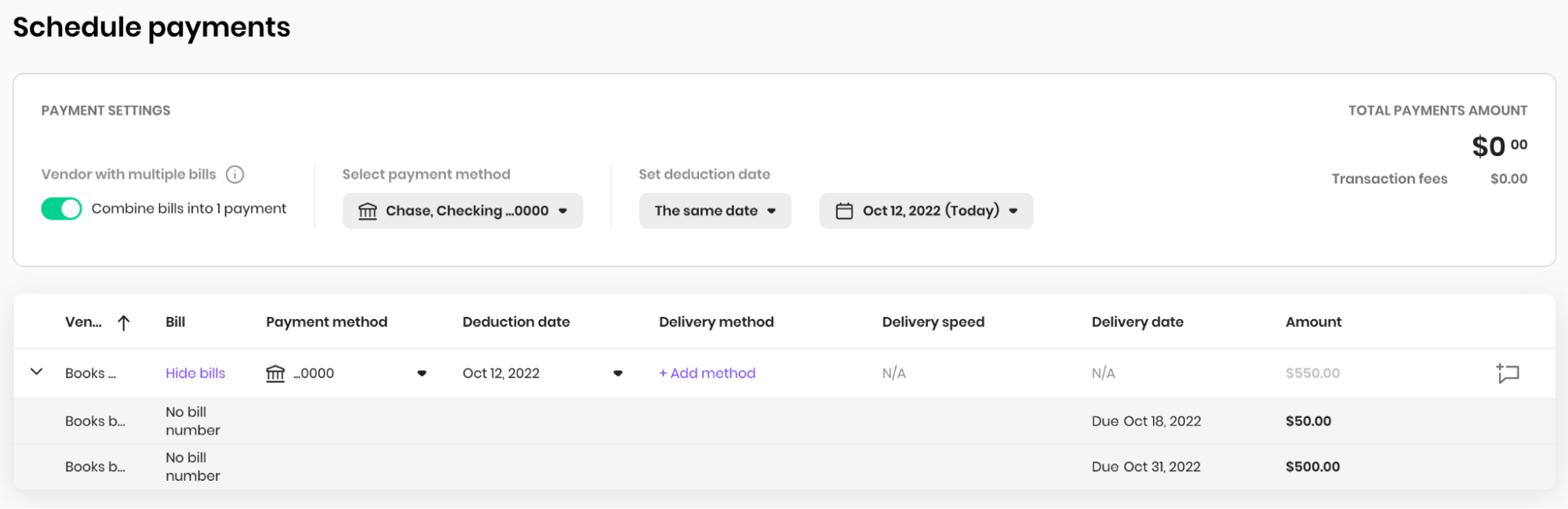
Combined payments let you pay multiple invoices from the same vendor in one transaction. Say you need to pay 10 different invoices from one vendor. Instead of scheduling 10 separate payments, you pay them all at once in a few clicks. You save time, save on check fees, and make life simpler for you and your vendor.
Sync bills with QuickBooks and Xero
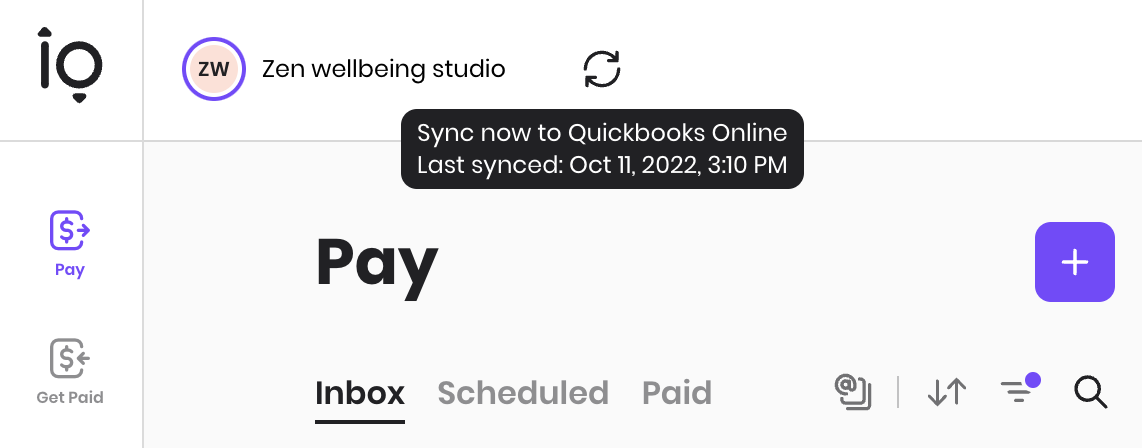
Melio keeps your books in sync with your accounting software. Whenever you create, edit, or delete a bill, payment, or vendor, the update syncs automatically in real time. It’s a two-way sync with QuickBooks and Xero, so both systems always match.
Get paid faster with a payment link

A payment link is a customized Melio link that lets your customers pay you whenever they want. Share it directly with customers, add it to your website, or attach it to your email signature. Your customers can start a payment on their own, so you no longer have to send a request.
Pay any vendor with a card
Want to use your card even when a vendor doesn’t take one? With Melio, you can pay any vendor by credit or debit card. Melio charges your card, then pays your vendor by bank transfer, check, or another method. Your vendor doesn’t pay extra to receive it. A 2.9% fee applies, and Melio accepts American Express, Visa, Mastercard, and Discover. You hold onto your cash longer and can earn card rewards.
Split large bills with Pay Over Time
Got a big bill you’d rather not pay all at once? Pay Over Time lets you split it into installments, while your vendor still gets paid in full, upfront. Repayment options range from net 30 to 12 monthly installments. Applying uses a soft credit check that doesn’t affect your credit score. It’s a simple way to smooth out your cash flow.
Pay international vendors
Do you work with vendors outside the U.S.? With Melio, you can pay international vendors in more than 80 countries and 15 currencies. You manage those payments in the same place as your domestic ones, so nothing slips through the cracks.
Send urgent payments faster
Need a payment to land right away? When something is urgent, you can choose a faster delivery option, like an instant or same-day bank transfer. Instant transfers can arrive within minutes on weekdays. A 1% fee applies to instant and same-day transfers, up to a $75 maximum. Faster options are subject to eligibility.
Capture bills automatically with AI
Tired of typing in bill details by hand? Forward any bill to your Melio Bills Inbox email address, and Melio’s AI captures the details for you. That includes the vendor name, invoice number, due date, and amount. You review everything before you pay, so you stay in control.
Manage and e-file 1099 tax forms
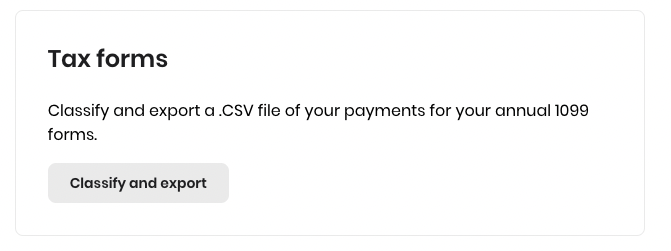
Melio now lets you e-file your 1099 forms through a Tax1099 sync. Standard Tax1099 fees may apply. You can still export a CSV file of your annual payments to quickly calculate all relevant business expenses. This makes it easier for you and your accountant to fill out 1099-NEC and 1099-MISC forms. With built-in 1099 and W-9 management, you and your accountant can stay organized and file faster.
Track payment history and ask Agent Mel

You can export a payment report for any date range as a CSV file. It includes details of processed payments over a time period you set. You can then share your payments with anyone, both on and off Melio. This helps with record keeping, and it makes it easier to calculate cash flow and budget.
Have a quick question? Meet Agent Mel, our AI assistant, now in Beta. Agent Mel answers your accounts payable questions in plain language. Ask when you last paid a vendor, which bills are due this week, or how much you’ve spent with a vendor.
Search, sort, and filter your payments
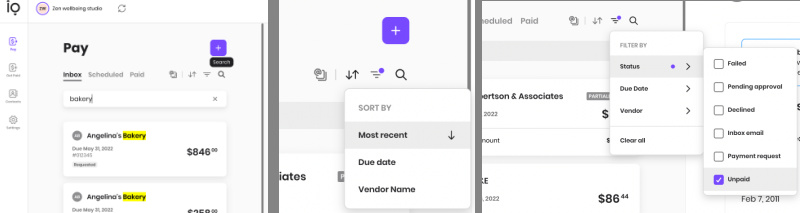
The search, sort, and filter buttons let you arrange your bills your way.
- Sort your bills by most recent, due date, or vendor name.
- Search anything across both Pay and Get Paid to pull up what you need in seconds.
- Filter bills in your Pay inbox by status, due date, or vendor.
Void a check payment in seconds

Yes, you can void a check as long as the recipient hasn’t cashed it, and it’s free. Maybe you want to change the delivery method, or you had the wrong mailing address for your vendor. You can void the check at any time and resend the payment however you’d like. You’ll also get an email reminder 14 days after the check is sent if it hasn’t been cashed, and you can void it starting the next day.
It’s time to pay and get paid faster
Take these features for a spin to see just how much they can improve your workflow.
Don’t have an account yet? Sign up for Melio for free.
Get paid faster FAQs
How can I pay several invoices to the same vendor at once?
Use combined payments to select multiple bills for one vendor and pay them in a single transaction. This saves you clicks and check fees.
How does a payment link help me get paid faster?
Share a custom Melio payment link in an email, on your site, or in your signature, and customers can pay whenever they want. You no longer have to send a payment request.
Can I void a check payment I already scheduled?
Yes. As long as the recipient hasn’t cashed it, you can void the check for free and resend the payment another way.
*This blog post is intended for informational purposes only and is not intended as financial advice.
**Melio does not provide legal, tax or accounting advice, and you should consult with a professional advisor before making any financial decisions.

ACH Payment Fraud: How SMBs Can Prevent And Mitigate Risks
Protect your small business from ACH fraud with simple steps you can put to work today.

Military Spouse Employment: A Path Through Entrepreneurship
See how entrepreneurship helps military spouses build meaningful, portable careers.
Black Friday Marketing Strategies for Small Business
Discover six easy Black Friday marketing ideas you can set up fast to boost sales this holiday weekend.

