

Accounts Receivable: How to Get Paid Faster and Simplify AR
Learn what accounts receivable is and simple ways to get paid faster by your small business customers.

- Key takeaways
- What is accounts receivable?
- Accounts receivable vs. accounts payable
- How the accounts receivable process works
- How to get paid faster and simplify accounts receivable
- How Melio makes speedy and efficient accounts receivable possible
- Sync your accounts receivable with QuickBooks Online
- Start accepting payments from your small business customers today
- Accounts receivable FAQs
Key takeaways
- Recognize that accounts receivable is the money customers owe you and a core driver of your cash flow.
- Send invoices promptly and set clear payment terms so you get paid faster.
- Offer easy digital payment options so customers can pay in a few clicks.
- Automate tracking and QuickBooks Online syncing to cut manual work and reduce late payments.
What is accounts receivable?
Accounts receivable is the money your customers owe your business for goods or services you have delivered but have not yet been paid for. It sits on your balance sheet as a current asset because you expect to collect it soon.
Getting paid on time is vital to sustaining your cash flow and keeping operations running. Strong accounts receivable habits are how you make that happen.
Accounts receivable vs. accounts payable
Accounts payable is money you owe to vendors and suppliers. Accounts receivable is money owed to you by customers.
One is money coming in, the other is money going out. Tracking both gives you a clear picture of your cash flow.
How the accounts receivable process works
The accounts receivable process turns a completed sale into cash in the bank. It usually follows a few clear steps:
- Agree on payment terms with your customer before you deliver.
- Send a clear, accurate invoice as soon as the work is done.
- Track each invoice so you know what is open and what is overdue.
- Follow up on late payments with friendly reminders.
- Record the payment and reconcile it against the invoice.
How to get paid faster and simplify accounts receivable
Collecting on time gets hard fast. With hundreds of transactions, you are re-sending invoices, waiting for checks, matching funds, and chasing late payers. A few simple habits make getting paid easier:
- Send invoices right away, with clear due dates and payment terms.
- Offer easy digital payment options so customers can pay in a few clicks.
- Send friendly reminders before and after the due date.
- Automate tracking so you always know what is outstanding.
When paying is simple, more customers pay on time, which steadies your cash flow and cuts the hours you spend chasing payments.
How Melio makes speedy and efficient accounts receivable possible
Accounts receivable has moved toward a more digital experience, and customers expect to pay online. Yet for many small businesses, getting paid still relies on paper checks in the mail. That is where Melio comes in.
Melio is an easy online solution that helps shorten and streamline the cycle between issuing an invoice to your business customers and getting paid for it. Melio offers a free Go plan that includes up to five free ACH bank transfers a month, with paid plans for higher volumes, and getting paid by bank transfer is free.
By optimizing the payment process, Melio makes it easy for your small business customers to pay their bills. Here is how it keeps things simple:
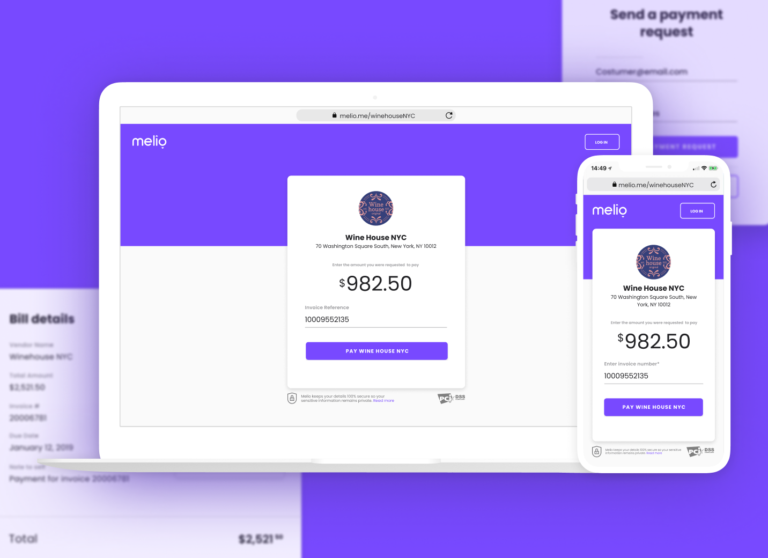
- Create a personalized payment link and payment page.
- Import a single invoice or a batch of invoices.
- Forward them to clients in a few clicks.
- Let customers pay from one screen, with no need to sign up to Melio.
- Get paid by ACH straight to your account, without sharing your bank details.
When you eliminate obstacles and offer a seamless, Venmo-like experience, more customers pay on time and your fulfillment rate climbs.
Sync your accounts receivable with QuickBooks Online
Melio syncs two ways with QuickBooks Online, so every payment updates your books automatically and you skip double data entry. You can export a .CSV of your customers and invoices, upload them to Melio, and see payments sync back to your QuickBooks Online account in real time.
Start accepting payments from your small business customers today
Automating your accounts receivable simplifies payments for your small business customers. With intuitive tools, flexible payment choices, real-time tracking, and a transparent, collaborative experience, Melio helps encourage speedy and efficient payments. Sign up for Melio and start getting paid faster today.
Accounts receivable FAQs
What does it mean to do accounts receivable?
It means tracking and collecting the money customers owe you, from sending invoices to recording payments.
Is accounts receivable hard to manage?
It can be time-consuming with many invoices, but clear terms, prompt invoicing, and simple online payment tools make it much easier.
What are examples of accounts receivable?
Unpaid customer invoices for products or services you have already delivered are the most common examples.
How can small businesses get paid faster?
Send invoices right away, offer easy digital payment options, and make it simple for customers to pay in a few clicks.
*This blog post is intended for informational purposes only and is not intended as financial advice.
**Melio does not provide legal, tax or accounting advice, and you should consult with a professional advisor before making any financial decisions.

6 Small Business Experts To Follow
Follow these six small business experts for practical advice on branding, marketing, cash flow, and growth.

How I future-proofed my accounting firm
Dave Kersting, the founder of consulting and bookkeeping firm Capovario, explains why today’s challenges call for creativity to attract and retain customers.

What Happens If an ACH Payment Is Returned? ACH Returns Explained
Learn why ACH payments get returned, what it costs your business, and how to prevent it.

