

How To Pay Vendors And Request Their Payment Details
Learn how to pay vendors and request their payment details so every payment arrives on time.

Key takeaways
- Choose a vendor payment method that fits how your vendor wants to get paid and your cash flow.
- Request your vendor’s payment details in Melio to schedule a payment even without their bank info.
- Confirm each vendor’s details and schedule payments early to keep every payment on time.
How to pay vendors in five steps
Paying a vendor means sending a supplier the money you owe using a method you both agree on. Here is how to do it in five simple steps.
- Confirm the invoice details and the amount you owe.
- Collect your vendor’s payment details, or ask them to add their own.
- Choose how you want to pay, such as a bank transfer or a check.
- Schedule the payment for a date that fits your cash flow.
- Send the payment and track it until your vendor gets paid.
Vendor payment methods to choose from
Vendors get paid in different ways, so it helps to know your main options before you send a payment.
- Bank transfer (ACH): a low-cost electronic payment sent straight to your vendor’s bank account.
- Paper check: a printed check mailed to your vendor, useful when they prefer checks.
- Credit or debit card: a way to pay that can help you manage cash flow, even when a vendor does not accept cards.
The right choice depends on how your vendor wants to get paid and how you want to manage your money.
How to request your vendor’s payment details
Send a secure request and let your vendor add their own details. Here is how it works.
- Start scheduling a payment for a new or existing bill.
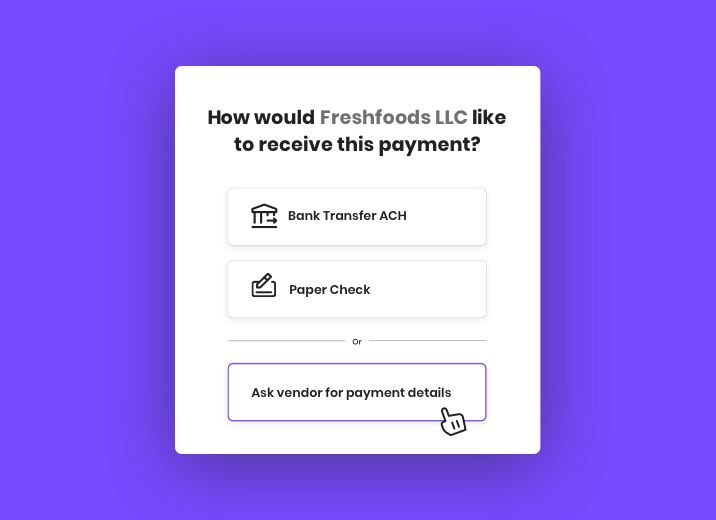
- When asked how you would like your vendor to receive the payment, select “Ask vendor for payment details”.
- Add your vendor’s email, then click submit and continue.
- Keep scheduling your payment as usual.
- Melio sends a secure form asking for your vendor’s payment details and how they want to get paid, by paper check or bank transfer (ACH).
- Once your vendor fills in the details, Melio schedules the payment for the date you chose and updates you with the estimated delivery.


What your vendor sees
Your vendor receives an email that includes the invoice number, payment amount, and your details.
Once they click the link in the email, your vendor can choose how they want to get paid, by paper check or bank deposit, and enter the details of where to send or deposit the payment.


Best practices for paying vendors
A few simple habits keep vendor payments smooth and on time.
- Confirm each vendor’s details before you pay to avoid failed or misdirected payments.
- Schedule payments early so they arrive by the due date.
- Keep a clear record of every payment for easy tracking and reconciliation.
- Pay digitally when you can to cut down on manual work and lost checks.
Get started paying vendors with Melio
Skip the back and forth over bank details and keep your payments on time. With Melio, you can request your vendor’s payment details, choose how you pay, and schedule everything in one place. Sign up for Melio to pay your vendors your way.
How to pay vendors FAQs
What is the best way to pay a vendor?
The best way is the method your vendor prefers and that fits your cash flow, often a bank transfer (ACH) for its low cost and speed.
How do businesses pay their vendors?
Most businesses pay vendors by bank transfer, check, or card, usually through a bill pay platform that schedules and tracks each payment.
What details do I need to pay a vendor?
You need the invoice amount and the vendor’s chosen payment method, plus their bank details for a transfer or a mailing address for a check.
*This blog post is intended for informational purposes only and is not intended as financial advice.
**Melio does not provide legal, tax or accounting advice, and you should consult with a professional advisor before making any financial decisions.
How To Pay Your International Vendors With Melio
Pay your international vendors in USD or local currency, all from the same place you pay every bill.

When to Hire an Accountant for Your Small Business
Learn what an accountant does, the signs you are ready to hire one, and how to choose the right fit.

5 Ways To Build Solid Relationships With Your Vendors
Build stronger vendor relationships with simple habits that earn better terms, priority, and reliability.

