

9 Must-Have Tools For Virtual Bookkeepers And Accountants
Discover the essential tools that help virtual bookkeepers work faster, safer, and with far less manual busywork.


- Key takeaways
- 1. Guest access to your clients’ financial accounts
- 2. A secure password manager
- 3. Electronic signature (eSign) tools
- 4. Secure cloud file storage system
- 5. Automatic and recurring bill pay
- 6. A public phone number that routes calls to your cell
- 7. A PDF to Excel converter
- 8. A calendar scheduling tool
- 9. Digital receipt capture
- Bringing your remote bookkeeping toolkit together
- Bookkeeping tools FAQs
Key takeaways
- Grant guest or view-only access to client bank accounts so you stop chasing monthly statements.
- Protect every client login with a reputable password manager instead of spreadsheets or sticky notes.
- Automate bill pay, eSign, and receipt capture to cut manual work and speed up client turnarounds.
- Add scheduling, secure cloud storage, and a virtual phone number to run a fully remote, professional practice.
1. Guest access to your clients’ financial accounts
Why you need it: Guest access lets you view a client’s bank accounts without waiting for monthly statements. A major pain point for bookkeepers doing monthly reconciliations is waiting for — and reminding — our clients to send us their bank statements every month. That’s why the first step of working remotely is to ask clients to grant you Guest Access or View Only Access to their bank accounts. Once given this limited capability, you can view online bank feeds, see images of checks cashed, and download statements without being able to access money or see sensitive account numbers.
Once added as a User, you will be able to create your own login, set your own security questions, and enter your cell phone for two-step authentication. While most banks allow you to add a second user for free, some may charge a monthly maintenance fee, so look up each bank’s protocol on their website.
Bookkeepers, in particular, also need access to merchant services or payroll software to enter journal entries or view payout reports. Most software allow business owners to add you as an Authorized User, which is often under the Team Management tab, so that you can log in and pull reports on your own time. The additional perk is that if you have multiple clients using the same software, you can easily toggle between companies without logging in or out. Gaining full, yet secure access to your clients’ financial information is key to frictionless interactions month to month.
2. A secure password manager
Why you need it: After the first tip, you’re probably thinking: I can barely keep track of my own passwords, let alone one for every client! We hear you. A password manager is an encrypted vault that stores every client login in one secure place. As accounting professionals, it is crucial to have a secure place to store logins, and your desktop does not count. A reputable password manager like 1Password is a strong choice, with LastPass another widely used option, both encrypted vaults that let you store an unlimited number of passwords. Both software have plug-ins for your browsers, so once you’re on that software’s log-in page, the app will prompt you to auto-fill your login (or toggle to the client’s login). You can also set up separate vaults, such as personal versus shared, and invite team members to the latter only.
3. Electronic signature (eSign) tools
Why you need it: If your firm still mails 100% of its documents to clients for signatures, you are guaranteed a three-day wedge between each document’s preparation and filing. Whether you are sending a client a contract or filing 1099 forms, electronic signature (eSign) software can speed things up. DocuSign allows you to save templates, specify where the client signs, and email the form. Once received, the client can sign, in seconds, from their laptop or mobile phone. For those skeptical of how secure this process is, DocuSign complies with the U.S. ESIGN Act and UETA, as well as the EU eIDAS Regulation — and the software automatically generates and stores an audit trail for every agreement.
In addition, E-File Magic is a fast and secure way to streamline and file IRS forms, including IRS 1097-BTC forms, 1098 forms, 1099 forms, 5498 forms, and W-2G forms. As an accountant, you can have as many filers or recipients in the system, and as long as your state participates in the combined Federal/State Filing (CF/SF) program, e-filing will allow you to meet state and federal filing requirements. Finally, the information is all stored, making next year’s filing even quicker.
4. Secure cloud file storage system
Why you need it. Many clients send sensitive financial information in attachments over email, which is a major security risk if your email is ever hacked. That’s why every virtual accountant and bookkeeper needs a secure and centralized online document storage system to give both your firm and your clients peace of mind. Two great and low-cost options are Revver (formerly eFileCabinet) and SmartVault which allow you to store and request internal and client documents. Both are encrypted and backed up automatically. With SmartVault, firms can create a branded portal, and clients have their own login which they can upload files to 24/7. What makes Revver unique is its smart automations that automatically save your documents into folders and name them for you as well as offering full text searching capabilities that scans not only the title, but content of each document as well to identify the one you need.
5. Automatic and recurring bill pay
Why you need it: Writing and mailing a check to a vendor — and then waiting for the check to clear — is both time consuming and anxiety inducing (Did it arrive yet? Was it cashed yet?). Melio, a free bill pay solution, lets you schedule payments now or later so you stop writing and mailing checks, and the vendor receives an email asking how they’d prefer to be paid (whether a check in the mail or bank deposit, both of which are free). What’s more, if cash flow is tight right now, but the vendor only takes cash or check, Melio offers a unique fix: You can use your credit card to defer payment and get rewards (2.9% fee) — while the vendor receives the payment the way they preferred, via a bank deposit or mailed check.
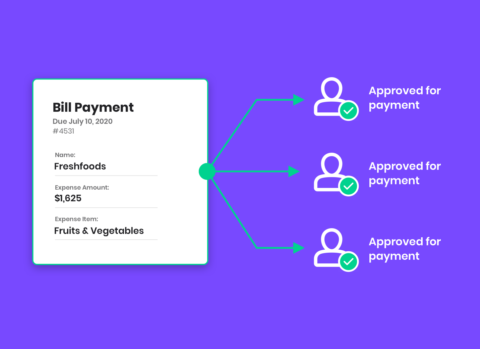
If your job involves scheduling bills for clients, Melio’s free Solution for Accountants allows you to manage multiple clients from a single dashboard, and their approval workflow lets clients approve bills right from their email, without having to log in. Since Melio syncs with QuickBooks Online software, the bill will hit the register the second it is scheduled (not cashed), allowing for more accurate reporting and cash flow predictions. Finally, for monthly expenses, such as rent, you can set up recurring bills to be sent automatically so you can permanently cross that task off of your list!
6. A public phone number that routes calls to your cell
Why you need it: If your office is based out of your home, the last thing you want to do is post your personal cell phone or home line on your website for scammers to phish for. Virtual phone systems allow you to set up one “public” number that forwards all calls to your personal cell phone or email. Prospective clients can call the public number listed online, and you simply pick up on your cell phone without them ever knowing. If clients leave a voicemail, you’ll get a transcribed message delivered right to your email.
- Google Voice: free option for solo-run businesses
- Grasshopper and MightyCall: call routing, virtual receptionists, mass texts, and call recording
7. A PDF to Excel converter
Why you need it: A PDF to Excel converter turns locked bank statements into editable data you can import. Onboarding new clients to online accounting software often requires uploading two to three years of historical data from the bank. The problem, however, is that bank feeds often go back only 90 days to 1 year, leaving us stuck with PDF statements that are impossible to copy and paste into a CSV file. The trick is to use a converter, such as PDFTables or Docparser. Using either tool, you can simply upload a PDF, and it extracts the data into a CSV or Excel file in seconds, which you can then prepare to upload to the accounting software. It is impossible to estimate the countless number of hours it would take to manually enter every bank item, making this tool essential.
8. A calendar scheduling tool
Why you need it: Does this email conversation sound familiar? You: Let’s set up a meeting. How is Tuesday at 9 a.m.? Client: Can’t make it. How about 10 a.m.? You: I’m booked. How about 3 p.m.? Stop. This. Now. Calendar scheduling tools allow clients to book a meeting on your calendar without ever talking to you about it. With apps such as Calendly or Acuity, you simply link the software to your calendar, set the times you’re available (or not), and select the video meeting software you use. You can also set up different calendars based on the type of client. For instance, Month Review appointments can be shorter than Quarterly Check-Ins.
Once a client books a time, the confirmation email automatically sends the client everything: the invite on their calendar and a link to the video meeting. To streamline this process further, in your email signature, add a link to your scheduling tool that says “Schedule a Meeting With Me.” That way, in your email exchange with a client, you can encourage them to use the link provided to find a time that works best to meet.
9. Digital receipt capture
Why you need it: Every accountant has at least one story of a client plopping a shoebox full of crumpled-up receipts on their desk. (Always the day before the tax deadline!) Receipts now fly into our clients’ lives in the form of paper, text, and email, leaving multiple places for them to live (or risk getting lost). As bookkeepers, we need to know not only what our client purchased, but why so we can accurately categorize the item.
Receipt capture tools collect receipts in one place. Tools such as HubDoc provide the client with a single email to forward receipts to and allow them to tell us what a receipt is through the app. Clients either upload receipts and categorize purchases right from their mobile phone or forward receipts with a message that we can see in the app (ex: “client lunch”). These tools integrate with most online accounting software, providing clients with their own Chart of Accounts when categorizing, and attaching copies of receipts to audit-proof their books. Both software offer special rates for accountants and bookkeepers: check out HubDoc’s free partner program.
Bringing your remote bookkeeping toolkit together
The right mix of tools turns a remote firm into a smooth, secure operation. Start with the workflows that cost you the most time each week, then add tools one at a time so your team and clients can adjust. When you are ready to take manual check writing off your plate, see how Melio helps accounting firms pay bills and manage client approvals from one dashboard.
Bookkeeping tools FAQs
What are the tools of bookkeeping?
Bookkeeping tools include client account access, a password manager, eSign software, secure cloud storage, bill pay, a virtual phone number, a PDF to Excel converter, scheduling software, and receipt capture apps.
Is Excel a bookkeeping software?
Excel can track basic income and expenses, but it lacks bank feeds, automation, and reconciliation, so most firms pair it with dedicated bookkeeping tools.
Is AI replacing bookkeepers?
AI automates data entry and categorization, but bookkeepers are still needed to review the work, advise clients, and handle judgment calls.
*This blog post is intended for informational purposes only and is not intended as financial advice.
**Melio does not provide legal, tax or accounting advice, and you should consult with a professional advisor before making any financial decisions.

Cross-Border B2B Payments: How to Pay Suppliers in 80+ Countries Without Wire Fees
Learn how to pay overseas suppliers faster and cheaper, without the cost of a bank wire.

7 Ways Online Accounts Payable Tools Make Life Easier
Discover how online accounts payable tools save time, protect cash flow, and make paying bills easier.
Payment Approval Workflows: A Small Business Guide
Set up payment approval workflows to control spending, pay on time, and cut errors as your small business grows.

