

Payment Approval Workflows: A Small Business Guide
Set up payment approval workflows to control spending, pay on time, and cut errors as your small business grows.

- Key takeaways
- Small business payments
- What are payment approval workflows?
- Why are payment approval workflows critical for your small business?
- How a payment approval workflow works
- Example of a small business payment approval workflow
- What capabilities do you need for a small business payment approval workflow?
- How to set up a payment approval workflow
- Payment approval workflow FAQs
Key takeaways
- Set clear approval rules so someone other than the payer reviews each payment before it goes out.
- Assign approval limits by person so smaller bills move quickly while larger ones get extra review.
- Map your steps and validation rules before choosing a payment tool that is simple to set up.
- Use a payment approval workflow to prevent errors and fraud while keeping payments on time.
Small business payments
Business payments are the agreed-upon amounts due to vendors, distributors, service providers, and other receivers who provide the materials, tools, and services you need to run your business. These can include:
- Rent or lease
- Contractors and freelancers
- Marketing and advertising
- Business services
- Utilities
- Insurance
- Business expenses, and more
They are paid against invoices that are issued for goods or services.
What are payment approval workflows?
A payment approval workflow is a set of rules that requires someone other than the person making a payment to review and approve it before the money goes out. In most payment tools, you decide who can approve, at what stage, and up to what amount.
Why are payment approval workflows critical for your small business?
A digital payment approval workflow gives small businesses transparency, timely payments, and control. Without one, your business can face:
- Slowed or late payments: Delays in payments can affect your relationship with suppliers, incur late fees, affect your credit or status, and hurt your business.
- Lack of transparency: An efficient payment approval workflow shows you what payments are coming up and lets you assess the status of your cash flow.
- Time wasted: A manual process means manual intervention and time wasted on emails, phone calls, and double-checking paperwork, time that could be spent on more productive things for your business.
- Potential for human error or fraud: The right payment approval workflow reduces human dependency, leads to fewer errors, and lowers the risk of tampering with invoicing and the payment process.
How a payment approval workflow works
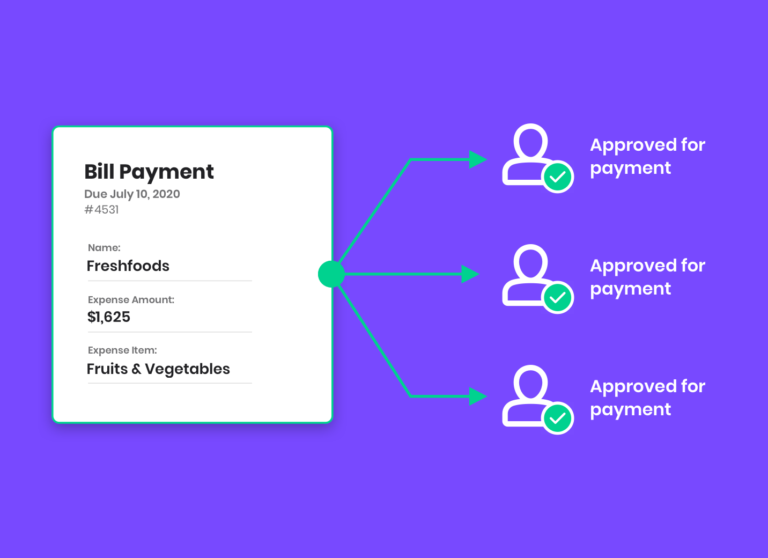
A payment approval workflow moves each bill through a set path before it gets paid. Here is how it usually works for a small business:
- Someone adds the bill or payment request into your payment tool.
- The details are checked against the invoice, such as the amount, the vendor, and the due date.
- The request is routed to the right person to review, based on the amount and your rules.
- That person approves the payment or sends it back with questions.
- Once approved, the payment is scheduled and sent using your chosen method.
Each step keeps the right people involved, so payments stay accurate and on time.
Example of a small business payment approval workflow
- Joe’s Tires is a small business.
- An external accountant manages all invoice payments.
- The office manager at Joe’s Tires has permission to place orders, make purchases, and approve invoices up to $2,500.
- Invoices over $2,500 need the approval of Joe, the small business owner, before they can be paid.
- Both the external accountant and Joe can request more information before approving an invoice, which helps catch errors before any money leaves the account.

What capabilities do you need for a small business payment approval workflow?
Before choosing a solution, know what you actually need. Look for a tool that offers:
- A clear overview of the process and all your upcoming payments
- Role-based permissions so you decide who can add and approve payments
- Approval-amount limits for each person involved
- Simple setup that does not require outside help
Many payment approval workflows are part of larger accounts payable platforms that are not necessarily designed for small businesses. You may find yourself paying for features that you do not need and will not use.
That being said, having an overview of the process and all your upcoming payments, along with the ability to assign payment roles and limit the amount each person can approve, might be enough to automate the process without the overkill of a complex accounts payable system.
Melio was tailored to answer the specific needs of small businesses, providing a straightforward payment approval workflow that lets small business owners invite (or disinvite) people and set permissions within your business.
Set up a payment approval workflow with Melio

How to set up a payment approval workflow
Setting up a payment approval workflow takes just a few minutes and helps your business run more smoothly. Follow these steps:
- Map who is currently part of your payment approval workflow and decide if you need to add anyone else.
- Set the amounts each person is allowed to approve.
- Decide what triggers approval, such as when an invoice is added or when it is ready to be paid.
- Group your invoice types and choose who should approve each one.
- Set your validation rules, including any documents that need to be added to a payment request.
- Choose a tool that is easy to set up and adapt to your needs, then configure your permissions.
As a small business owner, the ability to set up intuitive payment approval workflows can help your business run more smoothly. Melio makes it easy, it takes a few minutes, and it is free. You can invite and disinvite people as needed and configure permissions to match your requirements. To learn more, check out our FAQ.
Set up a payment approval workflow with Melio
Payment approval workflow FAQs
Who should approve payments in a small business?
Anyone other than the person who created the payment can be an approver, such as the owner, a finance manager, or a bookkeeper. The goal is to keep at least one extra set of eyes on every payment.
What is the difference between invoice approval and payment approval?
Invoice approval confirms that a bill is correct and should be paid. Payment approval is the final sign-off that lets the money go out. Many small businesses combine both into one simple workflow.
Can I set different approval limits for different people?
Yes. Most payment tools let you set who can approve payments and up to what amount, so smaller bills move quickly while larger ones get extra review.
Does a payment approval workflow slow down paying bills?
A well-designed workflow speeds things up. Clear rules and roles remove the back-and-forth of manual approvals, so bills get paid on time.
*This blog post is intended for informational purposes only and is not intended as financial advice.
**Melio does not provide legal, tax or accounting advice, and you should consult with a professional advisor before making any financial decisions.

How To Maximize Cash Flow With Digital Payments
Discover how digital bill payment tools help your business improve cash flow and stay financially healthy.

The Intentional Firm: 10 Predictions To Navigate The 2026 Accounting Landscape
Discover the 10 predictions shaping how accounting firms will grow, price, and staff in 2026.

Why Your Small Business Needs To Be On TikTok
Discover why your small business belongs on TikTok and how to start reaching new customers today.

