

How To Save Time As An Accountant And Reclaim 19 Hours A Week
Reclaim hours every week with simple time management habits built for the way busy accountants really work.


- Key takeaways
- Death by a thousand paperless cuts
- Prioritize high-value work first
- The art and science of batching
- Tame the communication beast
- Automate repetitive accounting tasks
- Delegate, delegate, delegate (even if you’re a solo practitioner)
- SOPs: your shield against chaos
- Eliminate energy drains (the hidden time killers)
- Survive busy season without burning out
- Reclaim your hours and get back to the work that matters
- Time management for accountants FAQs
Key takeaways
- Prioritize high-value work first so your best hours go to the tasks only you can do.
- Batch similar tasks and set clear communication rules to cut the context switching that drains your day.
- Delegate and automate routine work, like data entry and bill pay, to free time for advisory work.
- Manage your energy, not just your clock, to protect focus and avoid burnout during busy season.
Death by a thousand paperless cuts
It’s rarely one big inefficiency stealing your time. It’s the small friction points that add up: late “quick question” emails, constant context switching, and routine decisions you could systematize.
Small improvements compound dramatically. Saving 15 minutes on your morning routine might seem insignificant, but over a year, that’s 65 hours (more than a full work week) back in your life.
Prioritize high-value work first
Before you optimize how you work, decide what actually deserves your time. Most accountants treat every task as urgent, which is how low-value work crowds out the work that matters.
A simple way to triage is to sort each task by urgency and importance. Do the urgent and important work now. Schedule the important work that is not urgent. Hand off the urgent but unimportant tasks. Drop the rest.
Spend five minutes each morning sorting your list this way. It keeps your focus on the work only you can do, and it stops small requests from taking over your day.
The art and science of batching
Batching means grouping similar tasks so you do them in one focused block instead of scattered through the day. It works because context switching is productivity poison. Every time you switch from writing emails to reviewing tax returns to answering phone calls, your brain needs time to refocus. Research by Dr. Gloria Mark at the University of California, Irvine, found that after an interruption, it takes an average of 23 minutes and 15 seconds to return to your original task.
Time blocking that survives client chaos

Traditional time blocking advice assumes you control your schedule. But in accounting, client emergencies and regulatory deadlines often control you. Here’s how to make time blocking work in the real world:
Start with non-negotiable blocks. Choose your most important work—maybe it’s tax return preparation or financial analysis—and block time for it during your peak energy hours. Treat these blocks like client appointments.
Create admin blocks. Instead of checking email throughout the day, designate specific times: 9 a.m., 1 p.m., and 4 p.m., for example. During these blocks, process emails, return calls, and handle administrative tasks.
Build buffer time. Don’t schedule back-to-back activities. Leave 15–30 minutes between major tasks to handle unexpected urgent items without derailing your entire day.
Use theme days strategically. Maybe Mondays are for new client onboarding, Wednesdays for monthly closings, and Fridays for marketing and admin work. This reduces the mental energy required to switch between different types of tasks.
The email batching game-changer
Email is probably your biggest source of interruption. Here’s how to tame it:
Turn off notifications. Yes, all of them. Email notifications on your phone, desktop alerts, those little red badges—turn them all off (seriously). Check email on your schedule, not when a notification demands your attention.
Use the two-minute rule. When processing emails, if something takes less than two minutes to handle, do it immediately. If it takes longer, add it to your task list and schedule time for it.
Create email processing workflows:
- Delete/Archive: No response needed
- Delegate: Forward to team member with clear instructions
- Do: Handle immediately (under two minutes)
- Defer: Add to task list with specific deadline
Template common responses. Create templates for frequently-asked questions, meeting scheduling, document requests, and follow-ups. Most email platforms allow you to save these as canned responses or signatures.
Estimated time reclaimed: three to four hours per week through reduced interruptions and more efficient email processing
Tame the communication beast
Client communication consumes more mental bandwidth than most accountants realize. It’s not just the time spent on calls and emails, it’s the constant context switching, the mental energy required to craft responses, and the lingering worry about unanswered messages.
The “quick question” epidemic
We’ve all been there. A client sends what they call a “quick question” that requires 20 minutes of research and a detailed explanation. Multiply this by 20 clients, and suddenly you’ve spent your entire afternoon answering “quick” questions instead of doing billable work.
Establish clear communication protocols. Not every client question deserves an immediate response. Create tiers:
- Urgent: Tax deadline issues, payroll problems, anything that affects their ability to operate
- Important: Financial planning questions, compliance concerns, strategic advice
- Routine: General questions, clarifications, non-time-sensitive requests
Share these categories with clients during onboarding. Most people are reasonable when they understand your priorities.
Create a “quick question” policy. Try something like: “I’m happy to answer brief questions as part of our ongoing relationship. For questions that require research or detailed explanations, I’ll let you know if there’s an additional fee.” This sets expectations and protects your time.
Use video responses for complex explanations. Instead of typing a 500-word email explaining cash flow projections, record a three-minute Loom video walking through their financial dashboard. It’s more personal, often clearer, and can be reused for similar client questions.
Email templates that don’t sound like robots
Templates get a bad rap because most of them sound terrible. Here’s how to create templates that save time without sacrificing personality:
The key is customizable variables. Instead of “Dear Client,” try “Hi [Name], I noticed your [specific business metric] has [specific change] this month…” Fill in the brackets, and you have a personalized message with minimal thinking required.
Create templates for your most common scenarios:
- New client onboarding sequence
- Document request follow-ups
- Deadline reminders
- Service explanation emails
- Pricing and proposal responses
Pro tip: Include specific next steps in every template. Instead of “Let me know if you have questions,” try “Reply to this email with your preferred meeting time, or click here to schedule directly on my calendar.”
The phone call vs. email decision tree
Some conversations should never happen over email. Others should never happen over the phone. Here’s a simple cheat sheet: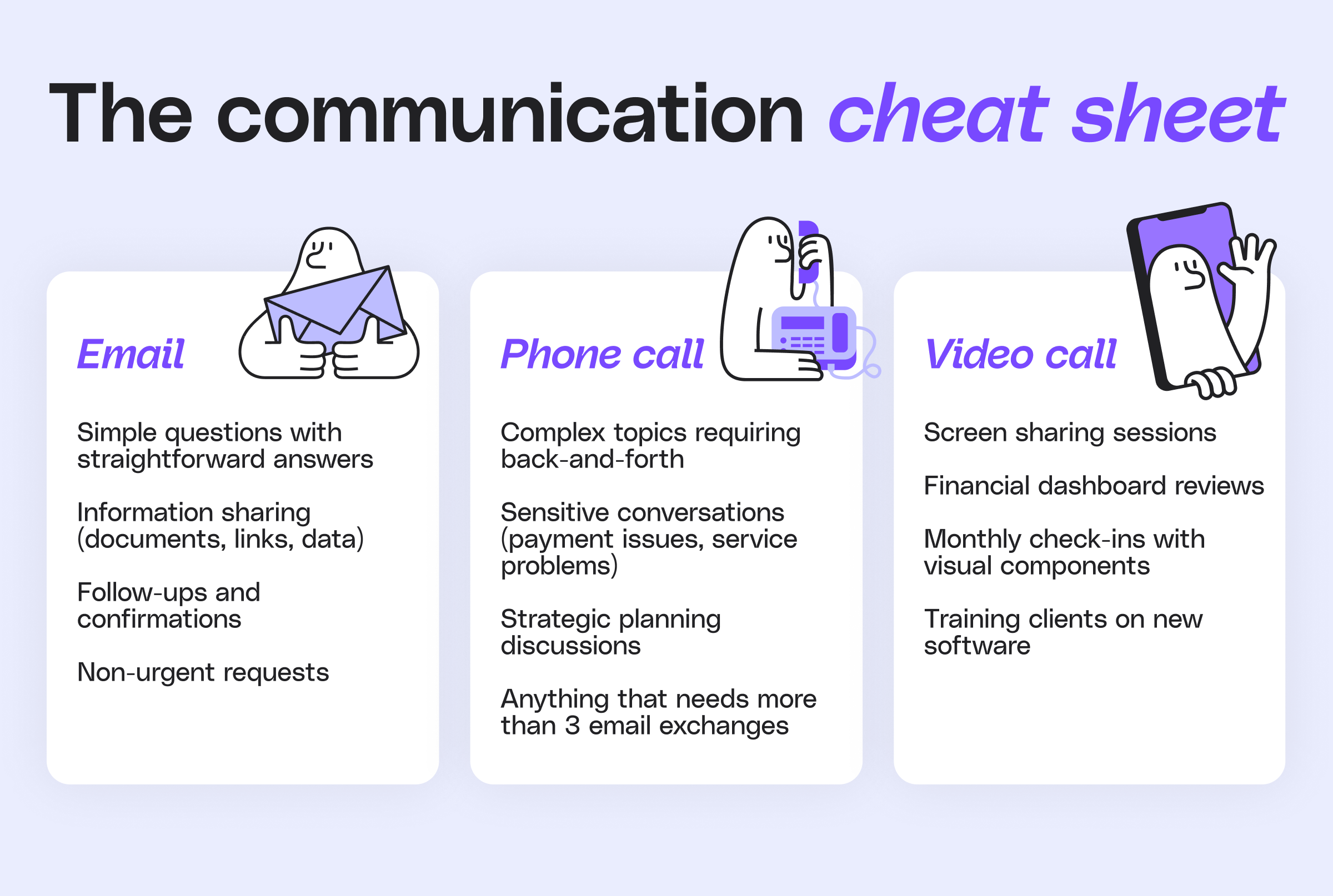
Phone calls for:
- Complex explanations requiring back-and-forth
- Sensitive conversations (payment issues, service problems)
- Strategic planning discussions
- Anything that would require more than 3 email exchanges
Email for:
- Simple questions with straightforward answers
- Information sharing (documents, links, data)
- Follow-ups and confirmations
- Non-urgent requests
Video calls for:
- Screen sharing sessions
- Financial dashboard reviews
- Monthly check-ins with visual components
- Training clients on new software
The goal is to match the communication method to the complexity and urgency of the topic.
Estimated time reclaimed: two to three hours per week on routine communication
Automate repetitive accounting tasks
Automation handles the routine steps that quietly eat your week, so you spend less time on manual work. You already know about bank feeds and receipt scanning, so focus on the tasks you still do by hand.
Bill pay is a common one. Paying vendors, chasing approvals, and recording each payment by hand adds up fast across a full client list.
A platform like Melio lets you schedule and batch vendor payments, sync them with your accounting software, and keep everything in one place. That removes the manual entry and the double-checking, and it gives you hours back to spend on client work.
Delegate, delegate, delegate (even if you’re a solo practitioner)
The biggest barrier to delegation isn’t finding good people—it’s letting go of control.
Accountants are trained to be detail-oriented perfectionists. The idea of someone else handling “your” work can feel uncomfortable.
But here’s the reality: Every hour you spend on $18 to $40 work is an hour you can’t spend on $150+ advisory work. Delegating the routine tasks frees you for the work that grows your practice.
What to delegate first
Start with tasks that are:
- Repeatable: Standard processes that can be documented
- Non-client-facing: Internal work that doesn’t require your personal touch
- Time-consuming but not complex: Things that take time but don’t require advanced expertise
- Clear success criteria: Tasks where you can easily determine if they’re done correctly
Great first delegation candidates:
- Data entry and basic bookkeeping: Transaction categorization, invoice entry, bank reconciliation matching
- Document preparation: Formatting reports, creating presentations, basic tax form preparation
- Administrative tasks: Scheduling, file organization, client onboarding paperwork
- Research: Gathering information for client projects, compliance requirement research
- Marketing tasks: Social media posting, blog post research and drafting, email newsletter creation, LinkedIn content scheduling
- Business development support: Lead qualification, CRM data entry, prospect research, follow-up email sequences
- Website maintenance: Content updates, blog posting, basic SEO tasks, keeping service pages current
Consider a virtual assistant
Virtual assistants aren’t just for online entrepreneurs selling courses. Many VAs specialize in working with accountants and understand the unique requirements of financial work.
- Belay: Specializes in professional services with vetted, US-based VAs
- Time Etc: Offers assistants with specific expertise in accounting and bookkeeping
- Fancy Hands: Good for one-off tasks and research projects
- LinkedIn: Post about your VA needs in accounting groups or your network—often the best recommendations come from other accountants who’ve already found great people
Note: LinkedIn is also a great place for building a reliable network of people who can handle different aspects of your practice.
Look on LinkedIn for:
- Junior staff members
- Bookkeepers
- Tax preparers
- Admin assistants
- Freelance specialists
- Other accounting firms for overflow work
- Technology consultants
- Marketing agencies
Creating delegation-ready processes: Document your processes as if you’re training someone who knows nothing about your business. Include screenshots, step-by-step instructions, and examples of what the finished work should look like. Yes, this takes time upfront, but it pays dividends every time you delegate.
Estimated time reclaimed: 5 to 10 hours per week through strategic delegation
SOPs: your shield against chaos
Standard Operating Procedures sound bureaucratic and boring. But they’re actually your secret weapon for scaling your expertise and reducing the mental load of running a practice.
Why SOPs matter more for accountants
Unlike other professions, accounting has high stakes for accuracy. A mistake in a tax return isn’t just embarrassing, it can result in penalties, audits, and lost client relationships. SOPs help maintain quality while allowing you to work more efficiently.
SOPs also solve the expert trap. When everything depends on your knowledge and expertise, you become a bottleneck. Clients wait for you to be available, team members can’t handle tasks without your input, and you can’t take time off without everything grinding to a halt.
Building SOPs that actually get used
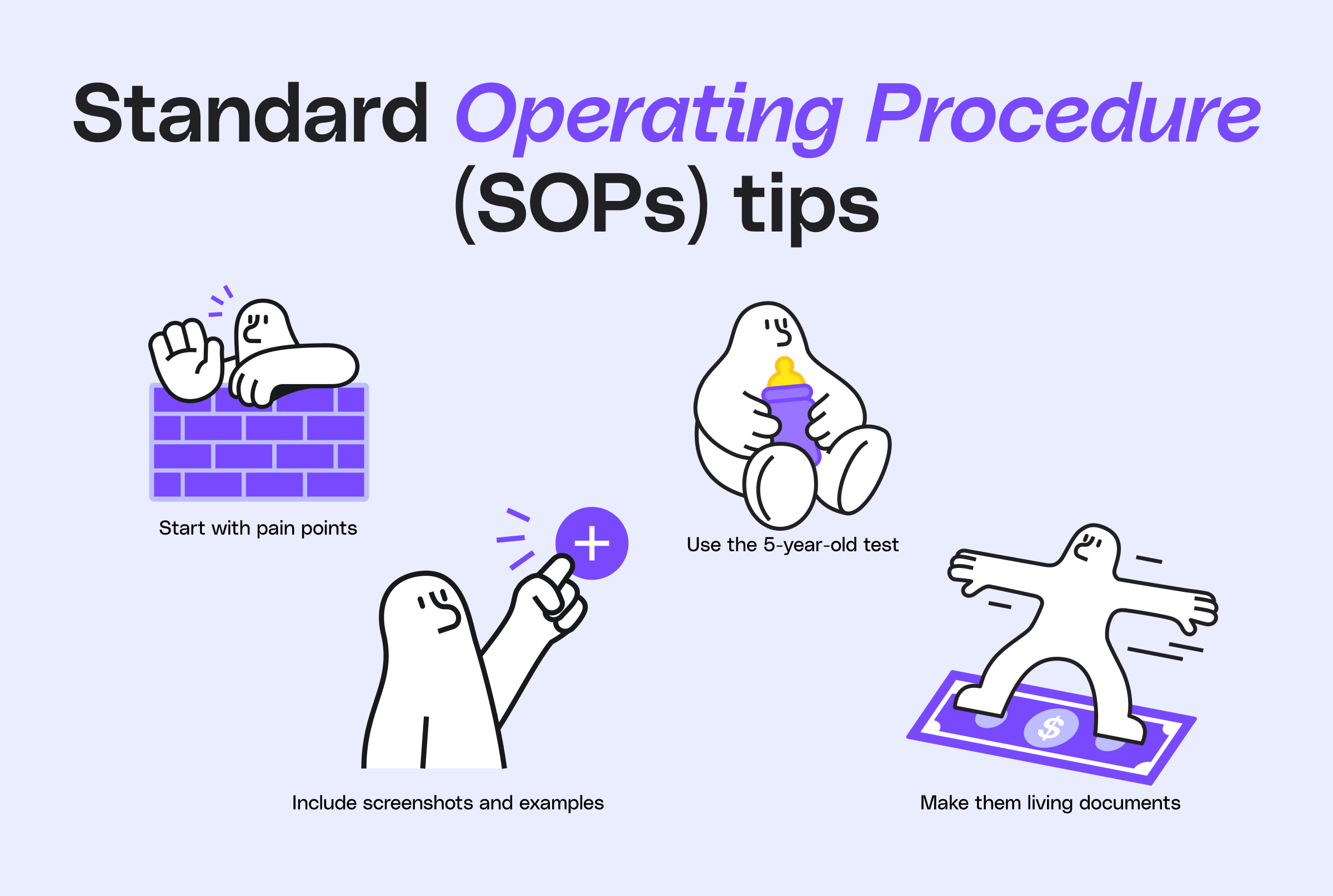
The key to useful SOPs is making them practical and accessible. Here’s how:
Start with your pain points. What processes do you find yourself explaining repeatedly? What tasks take longer than they should because you have to remember the steps each time? These are your first SOP candidates.
Use the five-year-old test. Write your SOPs as if you’re explaining the process to someone with no accounting background. If a reasonably intelligent person couldn’t follow your instructions and get the right result, your SOP needs work.
Include screenshots and examples. Don’t just say “enter the client information.” Show exactly where to click, what information goes in each field, and what the completed form should look like.
Make them living documents. SOPs should evolve as your processes improve. Schedule quarterly reviews to update procedures based on what you’ve learned.
Essential SOPs for every accounting practice:
- Client onboarding process: From initial contact to first deliverable
- Monthly client closing procedures: Step-by-step reconciliation and reporting process
- Tax return preparation workflow: Document collection through filing
- Invoice and payment processing: From time tracking to collections
- File organization and backup procedures: How documents are named, stored, and protected
Quality control built in
Good SOPs include quality checkpoints that catch errors before they become problems:
Build in review stages: For complex processes, include checkpoints where someone else reviews the work before it moves to the next step.
Create error-checking templates: Develop checklists of common mistakes to review before finalizing work.
Document exceptions: When processes don’t work as expected, document what happened and how it was resolved. This builds institutional knowledge that prevents similar issues in the future.
Estimated time reclaimed: two to three hours per week through reduced errors, rework, and decision fatigue.
Eliminate energy drains (the hidden time killers)
Sometimes the biggest time savings come from eliminating things that drain your mental energy rather than just looking at tasks that consume your calendar.
The decision fatigue factor
Every small decision throughout your day (what to work on next, how to respond to an email, where to file a document) consumes mental energy. By the afternoon, your decision-making capacity is diminished, which makes every task take longer.
Reduce daily micro-decisions:
- Standardize your morning routine so you don’t have to think about it
- Create default responses for common client requests
- Use project templates that eliminate setup decisions
- Establish standard meeting agendas so you don’t have to plan each meeting from scratch
The multitasking myth
Research consistently shows that multitasking reduces productivity and increases errors. For accountants, where accuracy is critical, the cost of multitasking is especially high.
Single-tasking strategies:
- Close unnecessary browser tabs and applications when working on focused tasks
- Use website blockers during concentrated work periods
- Turn off non-essential notifications on all devices
Energy management vs. time management
Your energy levels fluctuate throughout the day. Matching high-energy tasks to high-energy times can dramatically improve both speed and quality of work.
Identify your peak performance times: When do you feel most alert and focused? Schedule your most important work during these periods.
Match tasks to energy levels:
- High energy: Complex analysis, strategic planning, important client calls
- Medium energy: Routine compliance work, email processing, administrative tasks
- Low energy: Filing, organizing, simple data entry
Estimated time reclaimed: two to four hours per week through improved focus and energy management
Survive busy season without burning out
Busy season tests every system you have. The goal is not to work more hours, it is to protect the ones you already work.
Plan ahead before the crunch hits. Map your deadlines, set client expectations early, and block your peak hours for the work that needs the most focus.
Lean harder on your batching, templates, and automation during this stretch. The habits you built the rest of the year are what carry you through the busiest weeks without burning out.
Reclaim your hours and get back to the work that matters
Time management for accountants isn’t about squeezing more tasks into your day. It’s about creating systems that reduce friction, eliminate routine decision-making, and free up mental space for the work that matters most.
Start with the technique that addresses your biggest daily frustration. Implement it consistently for two weeks. Then build from there.
Your future self—the one who leaves the desk before dark and has time for strategic thinking—will thank you.
Ready to hand off the routine payment work that eats your week? Sign up for Melio and give your hours back to the clients who need them.
Time management for accountants FAQs
What wastes the most time for accountants?
The biggest time drains are client interruptions, manual data entry, and constant context switching. Systemizing these three areas reclaims the most hours.
What are the best time management tools for accountants?
The most useful tools automate repetitive work, like scheduling software for time blocking, template tools for client emails, and payment platforms like Melio for bill pay.
How can accountants manage their time during busy season?
Plan deadlines ahead, set client expectations early, and protect your peak hours for focused work. Lean on batching and automation to handle the routine tasks.
How do accountants avoid burnout?
Manage your energy, not just your clock. Do demanding work during peak hours, cut decision fatigue with routines, and delegate or automate low-value tasks.
*This blog post is intended for informational purposes only and is not intended as financial advice.
**Melio does not provide legal, tax or accounting advice, and you should consult with a professional advisor before making any financial decisions.

A Beginner's Guide To Invoice Approval Workflow
Build an invoice approval workflow that keeps your payments on time and your records clear.

A Small Business Owner's Guide To Accounts Payable Audits
Learn how an accounts payable audit keeps your business payments accurate, on time, and error free.

Military Spouse Employment: A Path Through Entrepreneurship
See how entrepreneurship helps military spouses build meaningful, portable careers.

